How to make my datasource multi-instance
Hi,
I created a datasource which runs a script with a bunch of parameters to retreive acual cloud usage& costs for our customers. Currently this script is running on the collector in the customers environment and working fine.
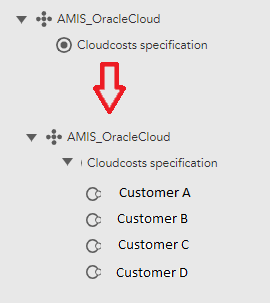
But I would like to centralize these data collections 1 single place. I would like to have multiple instances from my script running on 1 system,. Based on the name of the instance I can retreive all the parameters from a parameter file.
How can I make multiple instances of my script?
Thanks a lot!
Jeroen

Jeroen_Gouma
Posted 6 years ago·Last reply 6 years ago
4 comments
LM User
·6 years agoGood luck! The main thing to remember about Active Discovery is that it needs to return a list of instances, with a minimum of two values per instance: some kind of unique identifier and the displayName. Whatever unique identifier you choose will be addressable in the rest of the DataSource using the token ##WILDVALUE##. ##WILDVALUE## is used to tie collected data back to the instances, so whatever you use for discovery should match what you use in polling. Whatever you choose as the displayName will be addressable in the rest of the DataSource using the token ##WILDALIAS##.
Jeroen_Gouma
OP6 years agoThanks a lot for the swift reply. I noticed the multi-instance box, but indeed it was greyd-out. I will try this appoach and create a new version of the datasource, making it multi instance and see how I can query something that indicates the various instances. Beside that i will have to look into the BatchScript.
We are indeed a MSP and the script will definitly run on one of our own collectors, providing the results only on the specific customer dashboards.
Mike Moniz
·6 years agoWhen you create a new Datasource you will have the option to check a "multi-instance" box. You can't easily change it after creating the DataSource as it's greyed out in the UI. You can either export and edit the XML directly or best to just create a new DataSource with that option enabled and copy over the settings/script. Once you enable that option you can optionally choose to use an Active Discovery script or not. If you disable this option, then you can use "add monitoring instance" on the device (resource tab) to manually add instances. If you enable Active Discovery, you can automate the addition of customer instances, assuming you have a source list you can query. Note that using BatchScript is generally more efficient than using plain Script when it can be used.
Side note. It sounds like you might be an MSP? Keep in mind that DataSources will always run on the collector systems. So you don't want to collect data for one customer from another customer's collector. Best to do something like that from a collector you directly own. Unless by "customer" you mean your customer's customer.